

Is the CompuScholar Unity Course Worth It? (Honest Homeschool Review)
If you have a middle or high schooler interested in game development, coding, or even working for companies like Nintendo or NASA one day, finding the right curriculum can feel overwhelming.
As a homeschooling mom, I’m always looking for programs that are:
- Actually engaging (not boring textbook style)
- Easy to follow without constant help from me
- And most importantly… worth the investment

So after working through the CompuScholar Unity Game Programming course, I wanted to share an honest, real-life review—what it’s like, what your child will learn, and whether it’s actually worth adding to your homeschool.


What Is the CompuScholar Unity Course?
The CompuScholar Unity course is a game development curriculum that teaches students how to build real games using the Unity engine.
Instead of just learning theory, students are actually:
- Writing code (C#)
- Building game environments
- Creating and publishing their own projects
This is the kind of course that moves beyond “basic coding” and into real-world tech skills.
If you want to check it out or see current pricing, you can explore the course here: CompuScholar Unity Programming
What Your Child Will Learn (Step-by-Step)
One thing I really appreciated is how structured the course is. It doesn’t throw everything at your child at once—it builds skills gradually.


1. Understanding Game Development Basics
Your child starts by learning:
- How games are designed
- Roles within a development team
- How real game companies operate
This is huge if your child is curious about future careers in tech or gaming.


2. Learning Unity (The Game Engine)
They’ll begin working inside Unity, learning:
- The layout of the platform
- How objects and environments work
- How to navigate and build scenes
This is where it starts to feel real—not just theory.


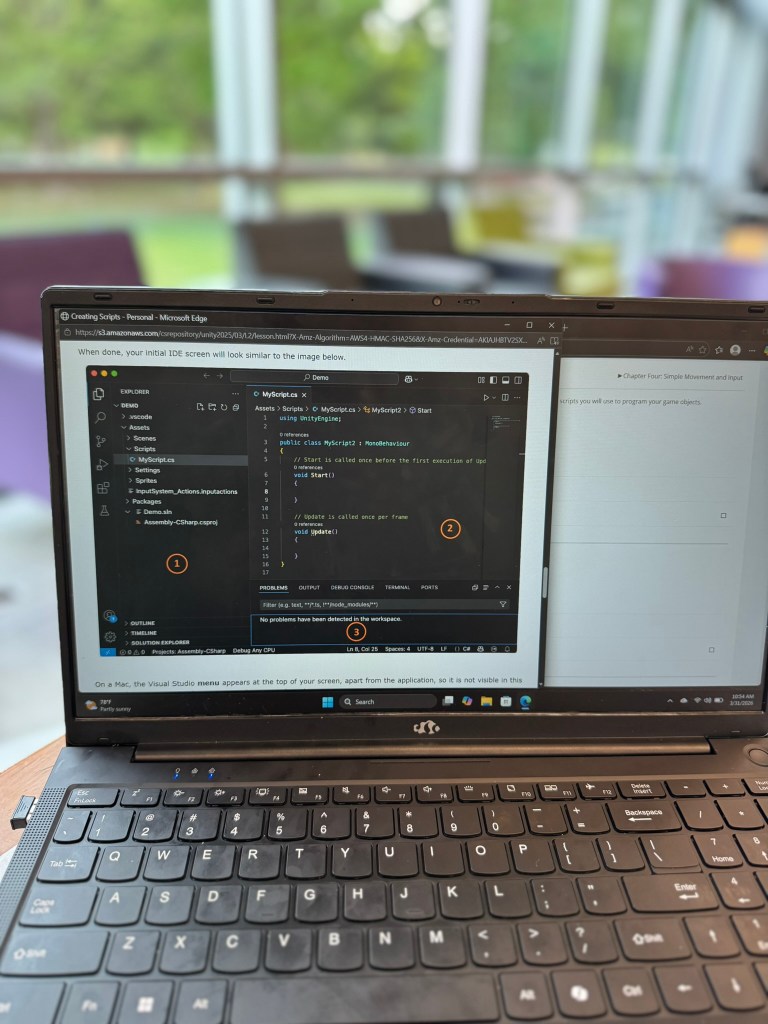
3. Writing Their First Code (C#)
The course introduces coding in a very beginner-friendly way:
- Creating scripts
- Understanding how code controls movement and actions
- Learning how games “respond” to players
Even if your child has never coded before, it walks them through it step-by-step.



4. Building Real Game Features
This was one of my favorite parts to watch.
Students learn how to:
- Move characters and objects
- Create simple gameplay mechanics
- Add visuals and interactions
They’re not just watching—they’re building as they go.


5. Midterm & Final Projects
Instead of random assignments, everything builds toward:
- A mid-term game concept
- A final project they design themselves
This helps your child:
- Think creatively
- Solve problems
- Actually finish something (which is huge)
- /im


6. Publishing Their Game
Yes—this part is real.
They learn how to:
- Package their game
- Run it outside of Unity
- Share it with others
That confidence boost alone? Worth it.
What I Loved as a Homeschool Mom
Let me say this in real terms…
This is the kind of course that lets you step back a little.
It’s Self-Guided
My child could move through lessons without me hovering constantly.
It Feels Like a “Real Skill”
Not busywork. Not filler.
This is something they could actually build on long-term.
It Keeps Their Attention
Because they’re creating something, not just reading.
It Connects to Real Careers
Game development, programming, engineering—this is exposure that matters.
Things to Consider Before You Buy
I always want to keep it honest, so here are a few things to think about:
- Your child should be comfortable using a computer independently
- It works best for middle school and up
- There is some problem-solving involved (which is a good thing—but worth noting)
If your child enjoys:
- Minecraft mods
- Roblox Studio
- Building or creating anything
They will likely LOVE this.
Who This Course Is Best For
This is a great fit for:
- Students considering STEM careers
- Homeschool middle schoolers and high schoolers
- Kids interested in coding or technology
- Creative kids who like building things


Is the CompuScholar Unity Course Worth It?
Honestly? Yes—especially if your goal is to give your child real, usable skills.
It’s not just a “coding class.”
It’s an introduction to:
- Game design
- Programming
- Creative problem-solving
And it gives your child something to be proud of at the end.
You can check out the course here and see if it’s a good fit for your homeschool: CompuScholar Unity Game Programming


How I’d Use This in a Homeschool Schedule
If you’re wondering how to actually fit this in:
- 3–5 days per week
- 30–60 minutes per session
- Works well as a tech elective or STEM credit
You can pair it with:
- Math
- Science
- Or even count it toward computer/technology credits


Final Thoughts (From One Busy Mom to Another)
If you’re like me, you don’t want to waste time or money on something your child won’t actually use.
This course stands out because:
- It’s practical
- It’s engaging
- And it builds confidence
And those are the kinds of things that stick.
Related Posts You’ll Love:
- What’s In Our Timberdoodle Box
- CompuScholar Java Programming Review
- CompuScholar Tech Essentials Review


